1. Ausweise digital dabei haben
Personalausweis (PID), Führerschein (mDL) und andere Nachweise auf dem iPhone — damit online einloggen, Alter belegen oder bezahlen.
EUDIpal ist eine iOS-App für iPhone und iPad, die deine digitalen Ausweise, alle Bankkonten und deine Bezahlfunktionen in einer Wallet vereint. Statt durch Menüs zu klicken, sagst du der eingebauten KI einfach, was du möchtest.
Deine Ausweise sind hier drin
Personalausweis, Führerschein, Altersnachweis und Login-Credentials — alle in einem Apple-Wallet-artigen Stapel.
Alle Banken auf einen Blick
Salden und Umsätze über sämtliche Konten hinweg — in einer Ansicht.
Einfach fragen, nicht klicken
„Überweise 500 € vom Giro aufs Sparkonto" — die KI bereitet vor, du tippst auf Bestätigen.
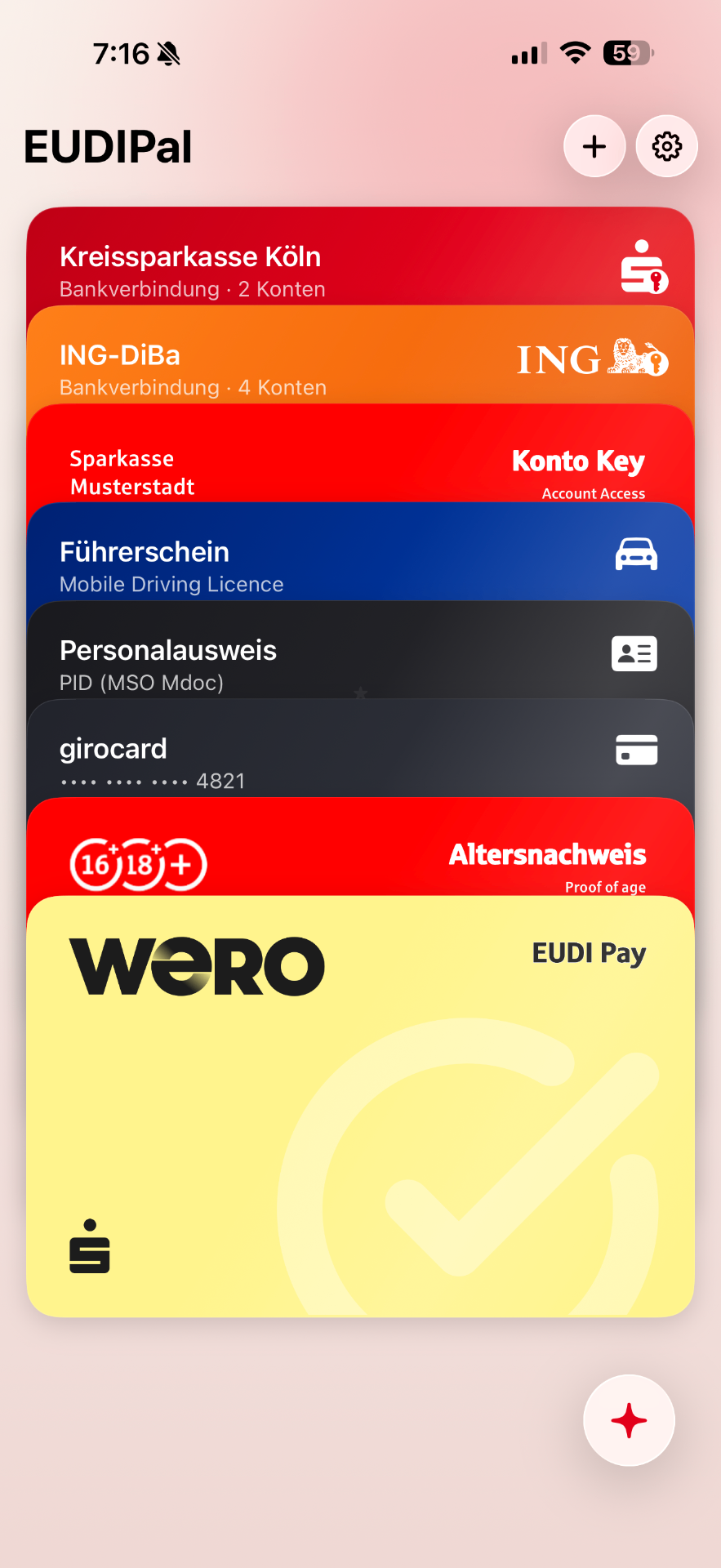
Drei Dinge, die die App kann — Ausweise zuerst, dann Banking, dann KI.
Personalausweis (PID), Führerschein (mDL) und andere Nachweise auf dem iPhone — damit online einloggen, Alter belegen oder bezahlen.
Verbinde deine echte Bank über FinTS — oder aktiviere den Demo-Modus mit drei fiktiven Banken. Salden, Umsätze, Überweisungen — alle Banken auf einem Bildschirm.
Ein eingebauter KI-Assistent versteht Fragen wie „Wo liegt gerade Geld ungenutzt?" und kann Überweisungen für dich vorbereiten. Die finale Bestätigung tippst immer du.
Vier echte Anwendungsfälle — Überweisung per Sprache, Bank-Login mit Wallet-Credential, Altersnachweis und WERO-Bezahlung — Schritt für Schritt mit App-Screenshots.
Neu hier. Du willst EUDIpal selbst ausprobieren. Wir zeigen Dir, wie das geht.
Werde Tester der EUDIpal Beta. Trage dich ein — wir laden dich per TestFlight zur Installation auf deinem iPhone ein.
Drei Schritte zum Einrichten. Etwa 5 Minuten.
Du brauchst dafür nur die Zugangsdaten deiner Sparkasse oder Bank. Alternativ aktivierst du den Demo-Modus mit drei fiktiven Banken.
Wenn du willst, kannst du eine KI deiner Wahl mit EUDIpal verbinden — dann steht dir eine Vielzahl von KI-Agenten bereit.
Richte dir deinen ersten Nachweis ein, zum Beispiel bei deiner Sparkasse. (Nur Demo)
Konkrete Anwendungsfälle — jeder mit einem Beispiel, das du direkt ausprobieren kannst.
Funktioniert am besten mit mindestens zwei Banken — entweder zwei echte FinTS-Zugänge oder dem eingebauten Demo-Modus mit drei fiktiven Banken. Stelle dem Agenten Fragen, die mehrere Konten gleichzeitig betrachten.
Beispiel zum Ausprobieren
Statt durch Menüs und Tabs zu klicken, bitte den Agenten, dich zur gewünschten Sicht zu führen. Funktioniert auch für mehrstufige Anfragen.
Beispiel zum Ausprobieren
EUDIpal kann eine Überweisung direkt aus einem fotografierten Beleg oder einer importierten Rechnung vorbereiten — Empfänger, IBAN, Betrag und Verwendungszweck werden erkannt, der Nutzer bestätigt nur noch nativ. Auswertung wahlweise in der Cloud (beim ausgewählten KI-Anbieter) oder vollständig auf dem iPhone.
Beispiel zum Ausprobieren
sparkasse-demo.digitallabor.dev im Mobile-Browser öffnen → SCA Credential ausstellen → QR-Code mit EUDIpal scannen → bestätigen. Die Karte erscheint im Wallet-Stapel.
sparkasse-demo.digitallabor.devBeim selben Issuer „Altersnachweis“ und „Account-Login“ wählen → QR scannen → bestätigen.
merchant-demo.digitallabor.dev öffnen → Produkte in den Warenkorb → Checkout → „EUDI Pay“ → Credential aus dem Carousel wählen → Face ID.
merchant-demo.digitallabor.devFalls der Merchant Alter oder Login abfragt, blendet EUDIpal die per-Attribut-Toggles ein. Nur das vorzeigen, was wirklich nötig ist.
Details, Antworten und Hintergründe — auf eigenen Seiten, damit du gezielt reingehen kannst.
Fünf Screencasts zeigen, wie die App auf dem iPhone funktioniert — von der Wallet bis zum KI-Agenten.
Videos ansehen FAQMultibanking, KI, Belege, Datenschutz — 10 Antworten in Kürze.
Zur FAQ PilotSieben Thesen, die wir mit EUDIpal untersuchen — plus Disclaimer und Voraussetzungen.
Zum Pilot ChangelogBeleg → Überweisung, lokale KI, robuster Chat — Details für Bestandsnutzer.
Zum ChangelogSchüttle dein iPhone in der App, um den TestFlight-Feedback-Reporter zu öffnen. Screenshot und kurze Beschreibung anhängen — jedes Feedback geht direkt ans Team.